Interactive online edition: Open the article with region zoom controls.
Why pay more for AI calls, and why pay before the user asks?
Optimize the cache; put estimates behind Calculate so the model comes first.


Synopsis
In our JarviSIM process optimization product, a user reused the same document from their library to build a process model, and we were billed for AI work every time. The cache was on and configured correctly. We analyzed the problem and found two causes: (1) unintended gold-plating inserted by AI agents: four identifiers in the request that nobody had asked for, so the cache never matched; and (2) an effort-and-cost estimate that ran inside every build, so the user paid for it and waited for it whether they wanted it or not.
Two fixes, two savings. We removed the identifiers, and the cache now answers a reused document. We moved the estimate behind a Calculate button: the user gets the finished BPMN model first and decides when, and whether, to spend on the estimate. We show how our jSwarm AI devops methods and tools found and fixed both, how /jRightSize prevents gold-plating and over-assurance that nobody asked for, and how a UX decision can cut cost and latency at the same time. JarviSIM is the product that supplies the real example.
Audience: AI Solution Product Managers · CIOs and CTOs · AI Developers
The business story
JarviSIM turns a written procedure into a process model. Users keep their documents in a library and reuse them: the same purchasing procedure, built again later the same day in a new session. The AI work is the same, so the answer should come from the cache and the bill should be close to nothing. It was not. Every reuse was billed as if it were new, and the largest single cost was an effort-and-token estimate that ran inside every build, so the user paid for it and waited for it whether or not they wanted it. Paying again for the same AI work looks like pennies in a demo and becomes the budget in production.
COST · IN FOCUS · PRODUCT RUNTIME
Two ways to spend less
Two changes, two savings. The cache is optimized, and the Human-AI effort and cost estimate moved behind a Calculate button, so it runs only when the user asks. At our modeled volume, AI spend on reuse falls from about $396,000 to about $72,720 a year. The arithmetic is in Part IV.
SPEED · IN FOCUS · PRODUCT RUNTIME
The model first; cached AI requests in about 0.2 s
Before: an AI request that misses the cache delivered output in 66.5 s. After: a cache hit returns in about 0.2 s, and a full BPMN process model rebuild's 13 AI requests delivered output in 2.6 s. The build no longer waits for the estimate; the user gets the finished model first.
QUALITY
The user decides when to spend
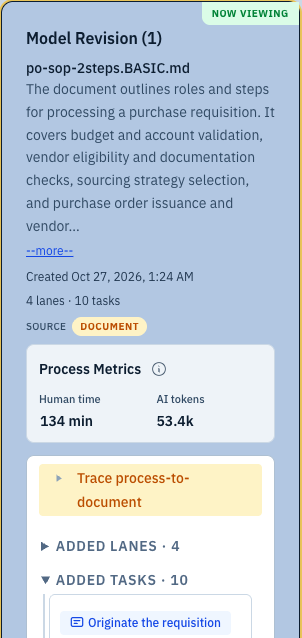
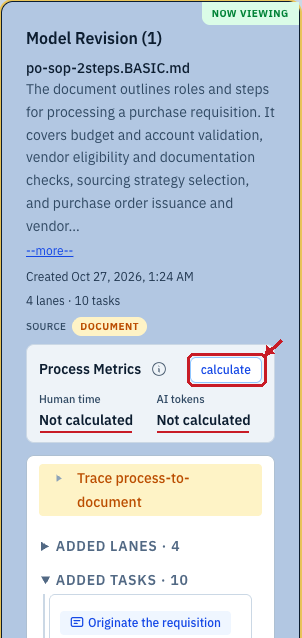
A better UX: the estimate runs when the user asks for it, not after every build. Until then the product says Not calculated; after calculate, the revision card shows the estimate ran once, on request. The user, not the pipeline, decides when the money is spent, and gets the finished model first instead of waiting for an estimate they may not want.
Terms used in this article
| Term | What it means here |
|---|---|
| Cache | A store of recent AI requests and their answers, reused instead of running the model again. This article has two layers of it. Our AI gateway's response cache answers an exact repeat of a request (same model, same instructions, same content) for free. The AI provider's prompt cache reuses the unchanged beginning of a request at a low rate, even when the rest of the request is new. |
| Cache hit | A request the cache could reuse. At our gateway: an exact repeat of a stored request, answered without a new model run. At the provider: a request whose beginning matches a stored one; that beginning is billed at the low rate and the rest runs normally. |
| On-demand calculation | The Calculate button on the revision card runs the human-effort and AI-token estimate only when the user presses calculate, not automatically after every build. |
more terms
| Term | What it means here |
|---|---|
| jSwarm · JarviSIM | jSwarm is our method: the loop, principles, practices, skills and scripts. JarviSIM is our product. It supplies the real development example in this article. |
| BPMN | Business Process Model and Notation: a standard way to draw a process diagram. |
| LLM | Large language model: the AI model that reads and generates text. |
| Schema · nonce · request-local handles | A schema defines the required data shape; a nonce is a one-time value; request-local handles are short names valid only inside one request. |
| Billed call | A request that did not match, so the model ran and we paid for it. |
| AI gateway | A proxy we run in front of the AI provider. It records every request and its spend, and keeps the response cache. |
| GWT | Given/When/Then acceptance scenario. |
| NFR (non-functional requirement) | A written rule about how the product must behave, such as "repeated builds reuse the cache". Part of what we call intent. |
| Given/When/Then scenario | An acceptance test written in the architect's own words: the starting state, the action, and what must be true afterwards. |
| Agent Acceptance Test | A walk through the real product by an AI agent, judged against the Given/When/Then scenario. |
| jQATester | The agent that walks the product like a user and judges each step against the acceptance scenario. |
/jRightSize | Our jSwarm skill that controls gold-plating and over-assurance. It asks of every added mechanism what outcome or failure warrants it, and what smaller alternative works. |
| Modeled volume | Our stated assumption for scale figures: 1,000 users × 10 documents × 10 reuses a month × 12 months = 1,200,000 document reuses a year; 80% of reuses hit the cache within one day (assumed); the user presses calculate after 70% of reuses, because some users do not care about the process's human and AI effort and cost (assumed). Ours, not a JarviSIM forecast. |
| jTestEngineer | The agent that designs and runs measured tests, such as the rebuild measurement in this article. |
Introduction
We are taking a multi-prong approach to solving the problem: LLM cache optimization techniques, as well as UX trade-off - creating calculation button instead of doing it automatically, incurring the AI cost when the user wants the information. LLM cache optimization is important, but cannot solve everything.
Those are the (human) architect's words. They name the two savings in this article: make repeated AI work actually repeat, so the cache can answer it; and give the user the finished model first, with a Calculate button for the estimate, so expensive work runs only when it is wanted. jSwarm is the method; the example is real JarviSIM development work.
Why pennies matter. A single cache miss costs cents, which is why cost is easy to ignore in a demo and hard to ignore in production. Take one modeled volume, ours and not a JarviSIM forecast: 1,000 users each reuse 10 documents 10 times a month: 100,000 reuses a month, 1.2 million a year. At the $0.33 a reuse we measured before the fix, that is $396,000 a year (modeled) for AI work the product had already done once, and it grows with every user and every reuse. Many AI demos never become economically feasible in production for exactly this reason: they are priced per request, and nobody counted the requests. Every scale figure in this article uses that same volume, always labeled modeled.
Not every request hits the cache. Even with the design fixed, our gateway's response cache answers only a request it has seen recently. A user can come back to the same session hours or days later and ask for another AI operation on earlier AI output; by then the stored answer may be gone, and that request pays full price again. So the after state needs assumptions about how often the cache answers. We use three, each labeled assumed:
- 80% of reuses repeat an identical request within one day and are answered free by our AI gateway's response cache (assumed, one-day cache life). The rest miss and pay full price.
- 70% of reuses are followed by a calculate press (assumed). The remaining 30% of reuses have no press: the user does not need the process's human and AI effort and cost estimate on that occasion. We assume the same press rate in cached and uncached reuse groups.
- A calculate press after a build the cache answered is answered too, because we assume a previous identical calculation is already present in the warm cache (assumed). A press after a build that missed pays full price.
The full before-and-after math is in Part IV, What it saves; skip there if you want the numbers first.
Real product example: JarviSIM document reuse
What follows is a real JarviSIM development example, used to illustrate jSwarm principles, practices, skills and scripts: the reuse that should have been free, the bill that said otherwise, the two causes, and the measured result after the fix.
Part I · Overall
Reuse the same document. Pay once.
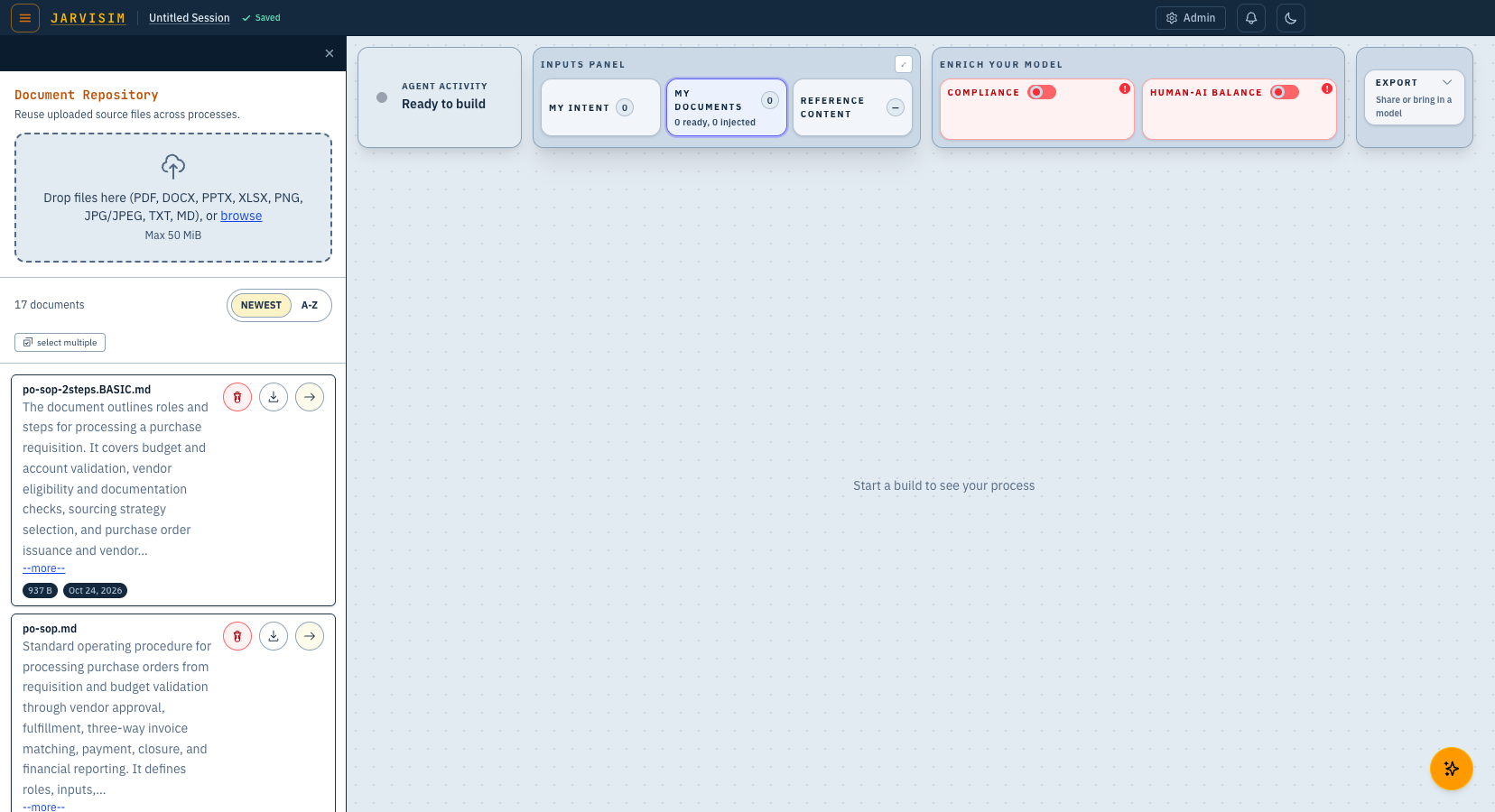
The Document Repository keeps uploaded source files so they can be reused across processes. The user picks the same purchasing procedure they built from before and sends it to the build, with no new upload. Same document, same intent, so the AI requests that build the model should be the same requests as last time, and our gateway's response cache answers a repeated request for free.
In the measured sessions, the stages that read the document did behave that way: 80 cache hits at $0 (measured). The problem started one stage later.
Part II · The problem
The cache was on. Every reuse was billed anyway.
No product screen shows cache hits or dollars, so this chart is drawn from the AI gateway's spend records for the measured sessions. Three things stand out. The build itself was cheap: $0.07 for all 11 build calls (measured). The build never hit the cache, and because every later stage uses the build as its input, none of them could hit either. And the two largest bills came after the build: $0.92 for the automatic human-effort estimate (plus $0.19 for its AI-token estimate) and $0.69 for a correction pass, a second request we make when the first answer does not pass our checks (measured, across the baseline sessions).
What a cache does here. Our AI requests pass through two caches before any model runs. First, our AI gateway, a proxy we run in front of the AI provider, keeps a response cache: an exact repeat of a recent request (same model, same instructions, same content) is answered from the stored answer, with no new request to the provider and no token charge. Free means exactly that: no new provider request and no token charge; running the gateway still costs money. Second, the AI provider's own prompt cache: when a request is new but its beginning is unchanged from a recent one, the provider reuses that beginning and bills it at a low rate, about one tenth of the normal input price; the changed end and the answer are billed normally. A request that misses at both layers runs in full at the high price. Three costs, then: free, low, high.
More: how the two cache layers differ
What each layer keys on. Our gateway needs the same request: the same model, instructions, messages and options. One changed identifier anywhere in the request is a different request. The provider needs only an unchanged beginning (a prefix): everything from the start of the request up to the first change can be reused, so stable instructions and content belong first and anything that changes belongs last. One early identifier breaks the prefix for everything after it, which is what the four identifiers in Part III did.
How long entries live. Our main development setup asks the gateway to keep answers for five days; the measured rebuild in Part IV used a one-day setting. The provider keeps a prefix for a short window: on the current models we use, a 30-minute entry by default and a 12-hour option; other providers use other periods, for example five minutes and one hour.
Writing versus reading. A provider prefix is written the first time and read on later requests. Reading is the low rate. Writing can cost more than normal input on current models, about 1.25 times for a 30-minute entry and more for a 12-hour one; older models charged nothing extra to write. So a prefix only pays when it is read again before it expires.
Cached and uncached input tokens. A provider bill separates input tokens that matched a cached prefix from those that did not, plus the output tokens. Only the matched beginning gets the low rate; the rest of the request and all of the answer are billed in full.
Why an exact repeat should stop at our gateway. A gateway hit avoids the provider altogether: no prefix write, no uncached tail, no output tokens. For a document rebuilt from the same library entry, that is the cheapest possible path, and it is the one the fix in Part IV restores. The provider's prefix cache is the complement for requests that really did change, such as an estimate after the user edited the model. Both the build and the calculate requests pass through the same gateway cache: a repeat calculate on an unchanged model can be answered there, while a press after a model change is a new request and misses. The scale figures in this article assume a press after a rebuild the cache answered is answered too, and price every other press as a miss.
More: cache hit assumptions
The scale figures assume how often the cache answers. Here is the reasoning behind each assumption, in order:
- With the four identifiers gone, the same document sent to the build produces the same AI requests (measured: 26 of 26 hits across two rebuilds). So a reuse inside the cache life is assumed to hit layer 1, our AI gateway's response cache, the free layer-1 cache: no new provider request, no token charge.
- We assume layer 1 keeps an answer for one day. That is a modeling assumption, not a setting: our main development setup asks the gateway to keep answers for five days, and the measured rebuild used a one-day setting.
- A calculate press on a rebuilt model the user has not changed sends the same request as the earlier press on that model: same model, same tasks, same options. We assume that earlier identical calculation is already in the warm cache. So a press after a rebuild the cache answered is assumed to hit layer 1 too, inside the same day. A press after a rebuild that missed is a new request and pays full price.
- Putting those together: about 80% of reuses are assumed to repeat within a day and hit; the other 20% do not. The misses are priced at full price, with no credit for the provider's prompt cache, which keeps the figures conservative.
Where the money went on reuse
| Stage | Billed calls | Cache hits | Billed $ |
|---|---|---|---|
| Before build: reading the documents | 5 | 80 | $0.00 |
| Build: synthesis | 11 | 0 | $0.07 |
| Build: document evidence ledger | 6 | 0 | $0.00 |
| After build: correction pass | 3 | 0 | $0.69 |
| After build: human-effort estimate | 13 | 0 | $0.92 |
| After build: AI-token estimate | 15 | 0 | $0.19 |
The chart runs in pipeline order. The stages that read the documents come first; their requests did not change between sessions, so they hit the cache 80 times and cost nothing. That shows the cache was working. The build requests carried the four identifiers and never hit, and every stage after the build inherited that miss. Business implication in one line: on reuse, the money was in the estimate and correction pass, and those stages could only hit the cache once the build did. The estimate also ran inside the same build, making the user wait for it.
Part III · Before
Four identifiers nobody asked for, and an estimate that ran before anyone asked.
We compared two build requests for the same document from two sessions, byte by byte. The instructions to the model, its tools, options and output format were identical. Every difference was an identifier that nobody had asked for:
- A per-session value mixed into the task and lane identifiers.
- The session's source-artifact identifier, copied into 24 lineage references.
- The build job identifier, which included the session identifier.
- A one-time “fresh draw” (another model attempt) marker on the first attempt of the evidence ledger.
Mask those four, and the two requests are identical. Every later stage takes the build as its input, so once the build differed, nothing after it could hit either. That cascade is where the money went.
In the cache-layers picture from Part II, the before state combines a gateway miss with partial provider-cache reuse. The gateway could not reuse the whole answer; the provider discounted the unchanged beginning while the rest still ran and was billed normally.
More: how we found them, and how each became a defect
We decrypted the two requests and compared every field. The system prompt, tools, options, schema and message count were identical. Every difference sat in the user message. Each identifier was recorded as its own cost defect under a written non-functional requirement: repeated builds reuse the cache unless there is a good reason not to. The requirement and its acceptance scenario are the worked example in Article 02. The fix removed each identifier from the request bytes rather than moving it elsewhere.
The estimate inside every build. The other half of the bill was a design choice. Inside the same build, the product automatically estimated the human effort and AI tokens of the modeled process. The build waited for it before it was done. That is useful when the user wants it and expensive when they do not, and its human-effort component was the single largest billed stage: $0.92 across the measured sessions, plus about $0.19 for the AI-token estimate (measured). This was a deliberate design choice, not unintended gold-plating. Part IV shows the UX improvement that changed it.
/jRightSize and /jFix: our skills, methods & tools preventing and removing gold-plating and over-assurance. Nobody asked for the four identifiers, which is what we mean by gold plating / over-assurance. Each addition felt reasonable to the human or AI agent adding it, but nobody weighed it against what the user needed.
Two jSwarm skills now do that weighing. /jRightSize decides how much to build. It asks of every added mechanism what outcome or failure warrants it, and what smaller alternative would do.
/jFix does the work to build/improve the feature. It diagnoses the problem, then checks GWT and NFR catalogs for intended product behavior. It writes a contract for the fix, makes the repair and proves it. The two work together: every /jFix contract carries a "necessity" section written with the /jRightSize method, and the contract check refuses a contract whose section is incomplete.
The Calculate button was a UX improvement delivered through /jFix: the acceptance scenario came first, then the change, then the judged walk in Part IV.
So now, the question “who asked for this?” is answered before the code is written, not after the bill arrives. Article 09 (coming) gives /jRightSize its worked example.
More: where /jRightSize acts in the jSwarm cycle
- In the fix cycle. The
/jFixcontract template has a necessity section bound to the/jRightSizemethod. The contract check runs before any reviewer sees the contract, and fails it when that section is missing or incomplete. - At check-in. The orchestrator's three-hourly review runs one necessity pass over the in-flight items. It records keep, narrow or cut, with one concrete cut or keep per flagged item.
- In a commander's lane. The commander runs the method at each slice's contract point, and again whenever a change reaches its second repair or review round. It reuses the existing record rather than adding a gate.
- Six questions it asks of any addition:
- What wrong behavior would defeat it?
- Which real caller uses the result?
- Would a do-nothing version still pass?
- Can the outcome be stated without naming the machinery?
- Does it test the rule, or freeze today's shape?
- Do its edits, false alarms and upkeep outweigh the protection?
Part IV · After
Identical requests, and an estimate on request.
The whole article comes down to two savings. The first is the cache: with the four identifiers gone, the rebuilt request is identical, so our gateway answers it. The second is the Calculate button: the user gets the finished BPMN model first, and the estimate runs only when they press. This Part shows the after state of each.
Identical requests: removing the four identifiers nobody asked for
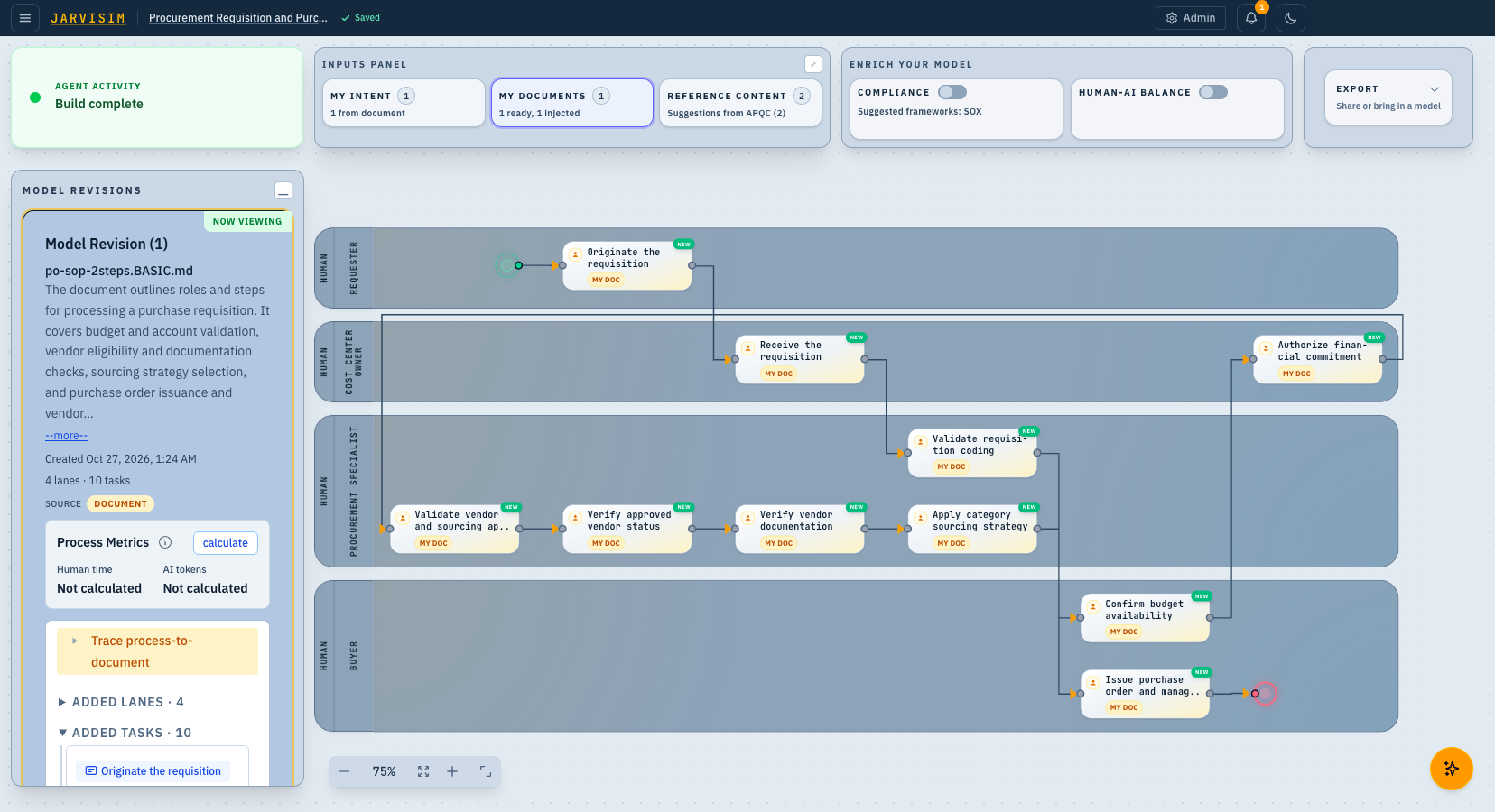
We removed each identifier from the request. The build completes with four lanes and ten tasks from the one reused document.
Measured run after the fix
Cache hits
26 of 26every request in two rebuilds served from cacheBilled
$0.00recorded gateway spendPer AI request
0.2 swas 66.5 s on a cache missMeasured by jTestEngineer in the development environment: the same document rebuilt twice, 13 requests each time, all answered from the cache.
Every AI request in the two rebuilds was answered from the cache in about 0.2 s; a request that misses the cache took 66.5 s (measured).
More: where a rebuild's time goes
The whole test run took 47 s: two rebuilds plus a check that the two models matched. The AI requests were answered from the cache in about 0.2 s each, so almost none of that time is AI time. Here is where the time went, in order, with each stage's class in parentheses: (code) is our own application code, (AI/LLM) is a model request.
- Start the test run and set up the first session with the document (code): about 14 s before the first AI request (measured); the second session took about 3 s to set up (measured).
- Rebuild, discovery requests and a first synthesis request (AI/LLM, 3 requests): 0.6 s of AI time, over about 3 s (measured).
- Rebuild, reading the document in shallow and deep passes (AI/LLM, 8 requests, some side by side): 1.6 s of AI time, over about 8 s (measured).
- Rebuild, the build request and the evidence ledger (AI/LLM, 2 requests): 0.4 s (measured).
- Rough non-request/orchestration residual: about 12 s per rebuild, estimated by subtraction. Reading answers, preparing requests and saving results are examples of code work, not a timed breakdown. Parallel requests mean summed request durations do not identify every cause of elapsed time.
- Compare the two rebuilt models (code): about 1 s (measured).
Two rebuilds at about 15 s each, plus the setup and the check, make the 47 s.
In the cache-layers picture, the after state is a hit at the first layer. The request never reaches the provider, so there is nothing to bill.
The user decides: a Calculate button instead of an estimate inside every build
Before the change, the estimate ran inside the same build, and the build waited for it before it was done. The architect made a product decision, not a caching one: deliver the finished model first, show Not calculated, and let the user press Calculate when they want the estimate. An estimate of a model the user has changed is a new request by design; caching alone cannot remove that work.
Before the change
After the change, before the press
Spend tokens and latency on primary outcome first. Let users ask for the extra features.
When the user presses calculate, the revision card is marked AMENDED and the action shows a check. The metrics now read Human time 134 min · AI tokens 53.4k, the product's displayed estimates for the modeled process. The canvas is unchanged: nothing was rebuilt to answer the question.
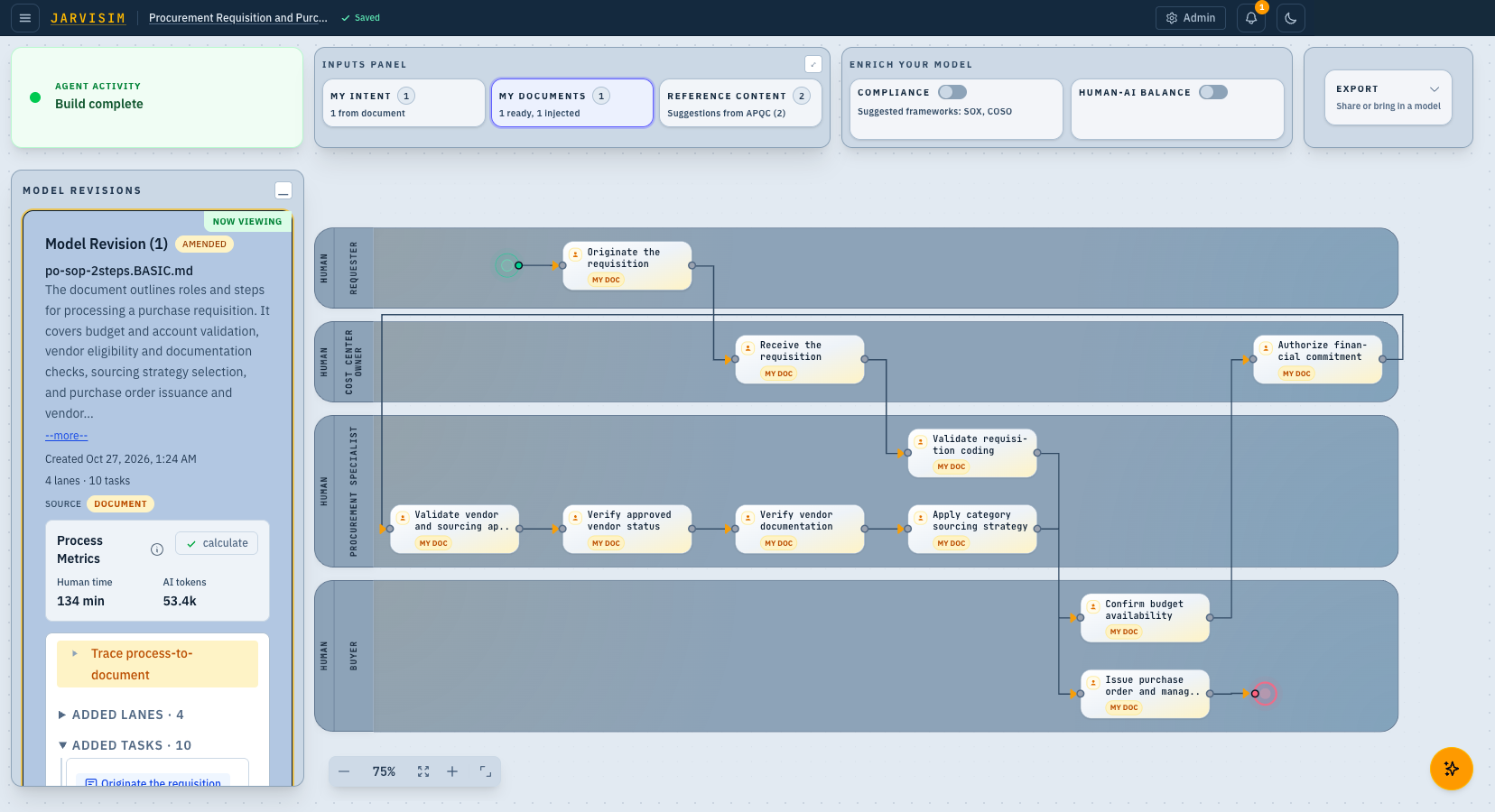
More: how we develop and test the UX change
Why this picture: the acceptance scenario for the change was written first, in the architect's own words, and an agent walk then judged the product against it. The capture below is from that walk on an earlier build.
The same rule at task level (an earlier build). This capture was taken during an Agent Acceptance Test walk run by jQATester. It shows the same rule for each task: AI token estimate: Not assessed and Human effort estimate: Not estimated, each telling the user to press calculate. The dark strip at the top is the test-harness overlay that drives and judges the walk. It is not part of the product.
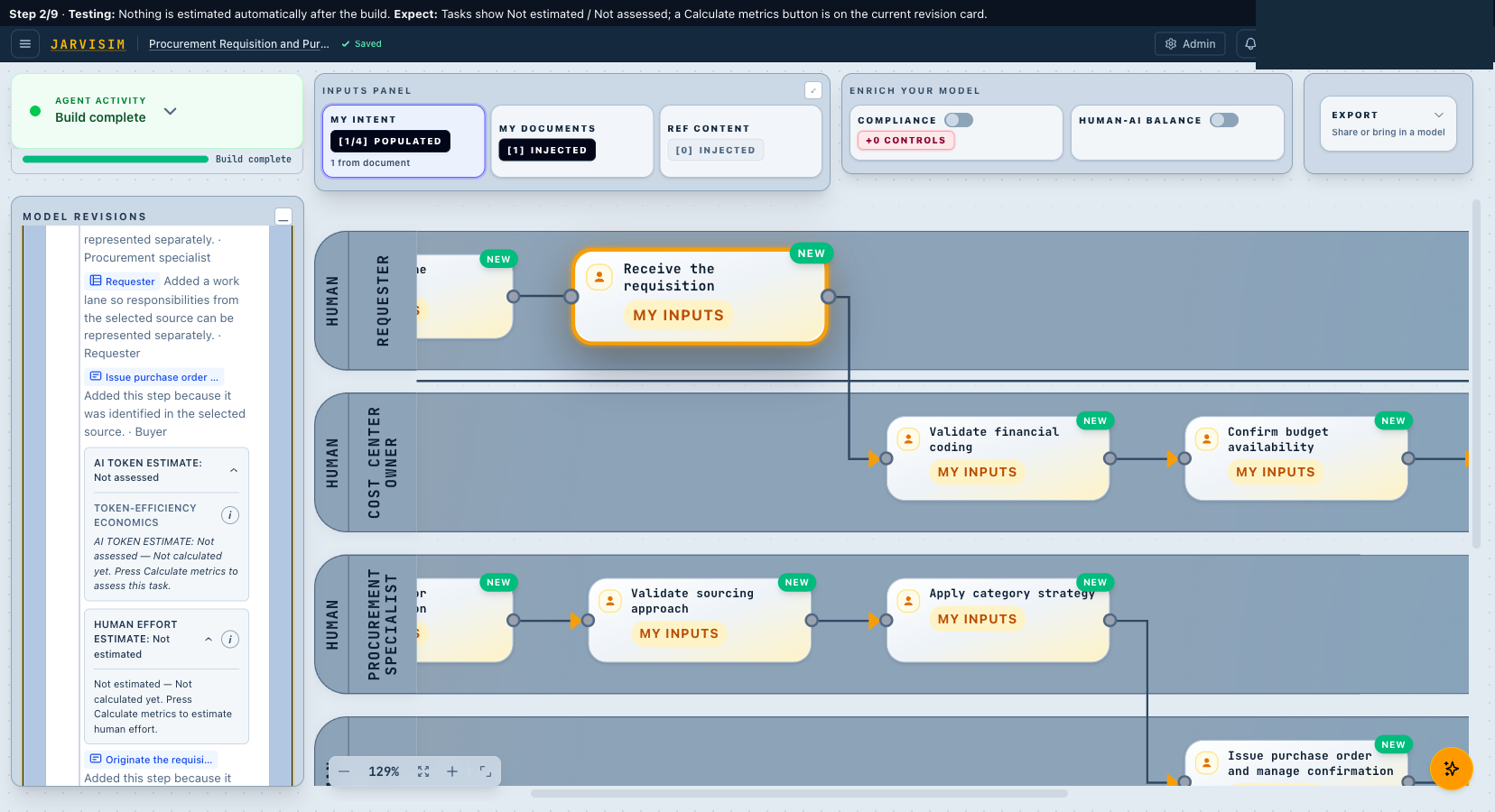
The acceptance scenario for this behavior was written in the architect's own words first: assessments run only when the user presses calculate, and until then the affected tasks show that metrics are not yet calculated instead of stale values. That sentence became the test. jQATester judged each step of the walk above against it.
What it saves
At our modeled volume
Two changes, two savings and one better experience. The build request is identical from one session to the next, so our gateway answers it. The estimate runs only when the user asks. Here is the math at our stated volume, split by the two changes.
Start with what a year of builds cost before, take away each saving in turn, and see what is still billed. Every figure is modeled at 1.2 million builds a year; the prices per build are estimated from the measured baseline; the 30% and 80% rates are assumptions.
| Step | How it is worked out | Yearly AI cost |
|---|---|---|
| Builds | 1.2 million builds a year × about $0.24 each. | $288,000 |
| Calculations, run automatically after every build | 1.2 million × about $0.09 each. | + $108,000 |
| Before: total | $288,000 + $108,000. | $396,000 |
| The user decidesCalculations users don't ask for | Users don't ask for the calculation 30% of the time: 30% × $108,000. | − $32,400 |
| The cacheBuilds it answers | The cache answers 80% of builds: 80% × $288,000. | − $230,400 |
| The cacheCalculations it answers | The cache answers 80% of the calculations users ask for: 80% × ($108,000 − $32,400). | − $60,480 |
| After: what is still billed | Builds the cache misses, $57,600, plus calculations it misses, $15,120. | $72,720 |
Total saving: $396,000 − $72,720 = $323,280 a year (modeled).
- From the cache: $290,880, the builds it answers ($230,400) plus the calculations it answers ($60,480).
- From the user deciding: $32,400, the calculations users don't ask for.
- Check: $290,880 + $32,400 = $323,280.
Speed per AI request: 66.5 s on a cache miss; about 0.2 s on a hit (measured). The Calculate button adds a speed gain of its own: the build no longer waits for the estimate.
More: assumptions behind these figures
The estimate is priced at the model it ran on before the change, GPT-6 Sol as configured at the time (list price at the time, per million tokens: $2.00 input, $0.20 cached input, $10.00 output), about $0.09 per press (estimated, from the measured baseline). Volume: 1,000 users × 10 documents × 10 reuses a month × 12 months (modeled, ours), with calculate pressed after 70% of reuses (assumed). Cache: 80% of reuses hit within one day (assumed); the same press rate applies in cached and uncached reuse groups, and a previous identical calculation is assumed present in the warm cache, so a press after a rebuild the cache answered also hits; every miss pays full price with no credit for the provider's prompt cache. The on-demand saving is counted first, then the cache saving on what remains. The speed figures are the same measurement as the Speed block at the top. Users can choose a smaller model; one measured press on GPT-6 Luna cost about one cent (measured, one press).
In plain terms: before the fix, every reuse of a document paid for the whole build again and for an estimate nobody had asked for. After the fix, most rebuilds cost nothing, because the cache answers them, and the estimate is paid for only when a user presses calculate and the cache has no answer for it. Most of the money saving comes from the cache; the better experience comes from the button: the model first, the estimate when wanted. Human judgment was redirected rather than removed: the architect decided what the user should pay for and when, and the user, not the pipeline, now decides when the estimate runs.
Optimized caching saves time and money –
/jFixbefore you ship (and before you get the bill)
The design lesson. Article 01 argued for using the model for judgment and planning, and deterministic tools for execution. This is the cost side of the same rule. A cache is a deterministic tool, and each layer pays only for what it can reuse: our gateway's response cache needs an exact repeat of the request; the provider's prompt cache needs only an unchanged beginning. Run-unique identifiers, correlation ids and nonces stay out of prompt bytes unless a stated reason needs them there. And when a stage is expensive by nature, make it the user’s choice: deliver the outcome they came for first, and put the rest behind an action. That is a product decision that saves both money and waiting.
Catching a defective request before it costs money. /jFix before you ship means running the fix cycle, diagnose, contract, repair, prove, before release rather than after the bill. For a defect in the request itself, the diagnosis starts with the request. The four identifiers were found by a byte diff of two requests after the bill arrived. Our DevOps practice now looks earlier. /jDebug --prompt evaluates the assembled first request, the "effective prompt" that the product actually sends, before another model attempt or a point fix. It reads the whole request in order, including the system message, tools, schema and options, and reports what in it is wrong, missing or accidentally variable, with the exact spans as evidence. It makes no model call to do so.
More: what /jDebug --prompt checks
The check scores the assembled request on nine questions, each from 0 (clear) to 3 (a demonstrated contradiction or impossibility), and a 3 must point at the exact conflicting text: Who has authority when two instructions disagree? Can every mandatory, forbidden and schema rule be obeyed at once? Are the facts a decision needs usable where the decision is made? Does what the prompt teaches match what the consuming check accepts? Are examples kept separate from live identities? Is every required fact supplied, or owned by code? Is the model being asked for something code can derive, such as identifiers and counts? Does the request fit its allowance without truncating an obligation? Do corrections and variants keep the original obligations?
Two habits matter for cost. First, code derives identity, counts and coupled fields; the model is never asked to restate a fact code already knows, and long opaque identifiers are replaced by short request-local handles that code resolves afterwards. Second, every finding at the top severity becomes a test in the fixing contract, shown failing on the real pre-fix request and passing after the change, so the fix is proved on the request that was actually sent rather than on a template. The record is appended to the existing debugging receipt; no provider call, repair or retry is part of the check.
For Claude Certified Architect–Professional readers
Anthropic's guidance on prompt caching explains that a cache hit needs a prompt prefix identical to one recently cached, and that varying content such as timestamps and per-request context belongs after the static prefix. We apply this on a real product. In JarviSIM the varying parts were inside the body of the build request, so we removed them, and we let our own AI gateway answer an exact repeat before the provider is asked at all. We answered the cache question with per-stage hit and billed rows plus a byte diff of two misses, never with configuration alone. And where a stage is new work by design, we made it a product decision: run it when the user asks.